COMMUNITY PROJECT · SPACE ARENA
VirusBlaster: ships, neon, and space battles by Zaebal
A neon interface, your own ship, and space where you must maneuver and shoot. Zaebal community member creates VirusBlaster — a browser arena with combat, ship progression, and a sci-fi vibe.
Non-competition · No contest voting
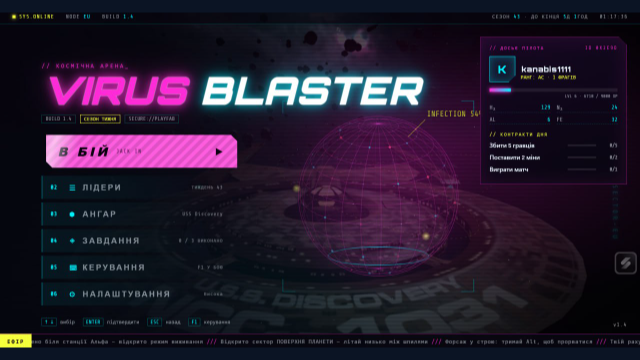
A space arena with its own character
According to the author, in VirusBlaster you control a ship, fight other players or waves of virus drones, and develop your vessel. This project is for those interested in space combat, maneuvering, and gradual system mastery, rather than just a single fire button.
The visual mood is set by the menu: neon, large letters, a pilot panel, and onboard computer styling. It features separate sections for combat, hangar, missions, leaderboards, controls, and settings. The author mentioned being inspired by the series Star Trek.
How to try VirusBlaster
- Open VirusBlaster website. For the first experience, it is more convenient to use a computer.
- On the login screen, select Play as guest, if you want to try the game without registration. The site warns: guest results are not counted toward the leaderboard.
- First, go to Controls. The interface also includes an F1 hint for controls.
- Complete the available control exercises, then proceed to combat with the button Fight.
The ship is more than just WASD
The controls page explains movement, rotation, weapons, and camera separately. Start with a few basic actions; you don't need to memorize all the keys at once.
| Action | Key |
|---|---|
| Move forward / backward | W / S |
| Turn left / right | A / D |
| Move up / down | Space / Shift |
| Accelerate / brake | Alt / Ctrl |
| Lasers | Left mouse button |
| Change camera | C |
The menu also has gamepad and phone tabs. Their presence alone does not guarantee equally smooth gameplay on all devices — for your first run, we recommend a keyboard and mouse.
Author, concept, and Grok
The project was submitted by a community member under the nickname Zaebal. In the application, they specified the tool Grok 2.0. This is information from the author, not an independent audit of the model used or the entire source code.
For the community, the interesting part here is the attempt to combine several interconnected systems: ship controls, combat, hangar, quests, and progress. Such a project provides plenty of material for discussion — how to explain complex controls, teach a beginner, and create an interface that people actually want to figure out.
Our community project
This page presents the work of a member of the Ukrainian Vibe Coding community. The game is published as a separate project outside the Vibe Jam 2D contest: it does not participate in contest voting or prize distribution.
Want to discuss ideas, tools, or your own prototype? Join our Ukrainian vibe coding community. For authors, there is a page "Suggest a project".
Discussion
Share your opinion or ask about the material. Your nickname and comment text will be visible to everyone.
Log in via email
Get a one-time code. No password required.
The code is valid for 10 minutes. Logging in does not subscribe you to the newsletter. Data usage.
Or log in via ChatGPT ↗Loading comments...