Organizing chaos into folders: Origami Notes by BaraniukConnection
A project idea, a shopping list, weekend plans — all somewhere between "New note" and "New note 17". A member of our community BaraniukConnection created Origami Notes — an Android notepad that organizes texts, lists, and tasks into intuitive folders. He came up with the app, designs it, and determines the next steps. Claude helped him with the coding.
Updated October 20, 2026, with developer notes on the app's progress.

Why Origami Notes: everything about one matter — in one place
This is a personal Android notebook for texts, lists, and tasks, conveniently stored together by topic. For example, a 'Renovation' folder might contain furniture dimensions, a shopping list, and Saturday chores. Each entry has its own format, but they all belong to the same matter.
The main principle of Origami Notes is folders first. They can be nested, expanded into a tree, and entries can be moved between branches. Search by title and text helps find what you need, while pinning keeps important items at the top. According to the README, no account is required; notes are stored locally, available offline, and can be exported to a JSON file.
Developer BaraniukConnection — Oleksii, a member of our community. In his open repository there is already code, an installation APK, and screenshots. We are looking at the beta version of his own Android product, which he continues to develop.
Note — to record a thought
A text note. The editor supports formatting and links, and important entries can be pinned.
Task — to see things to do
Tasks are arranged in tiles. According to the author, their size depends on priority.
List — to break down into points
A list with checkboxes and one level of sub-items: convenient for shopping or a small plan.
Widgets — to keep handy
The code includes widgets for tasks, individual notes, and folders for the Android home screen.
How it might work: preparing for a trip
Here is an editorial example based on the described B21 features:
- Create a 'Trip' folder. It will store everything related to the journey.
- Add a text note with a route, addresses, and links. According to the README, holding the button + opens the entry type selection.
- Make a 'What to Pack' List and check off items as you pack them. Use Tasks for several preparatory chores; set a higher priority for the most important one.
- Pin the required entry or move it to a widget. Before experimenting with the beta version, save an export in the settings.
The same can be used to organize studying, household chores, or developing your own project. The app will primarily interest those who like their own folder structure and want to keep notes on their phone. Cross-device synchronization is still in the plans according to the B21 description.
Minty order on the screen
The author's screenshots show a light interface with mint accents, rounded cards, and a separate folder tree. Pinned entries are clearly separated from the rest. Below you can see three screens; click on an image to open it larger.
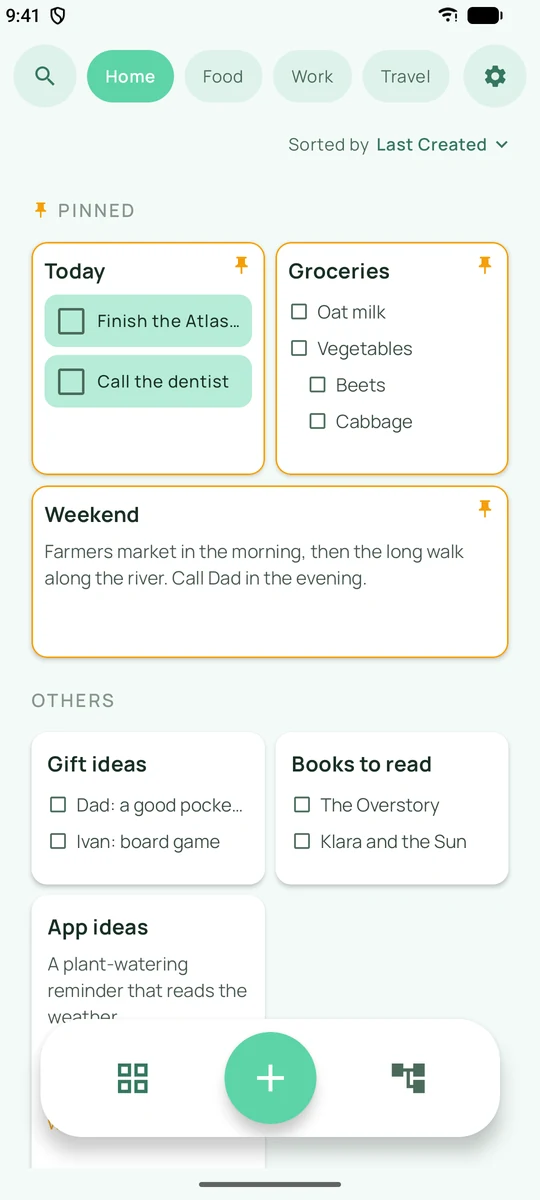
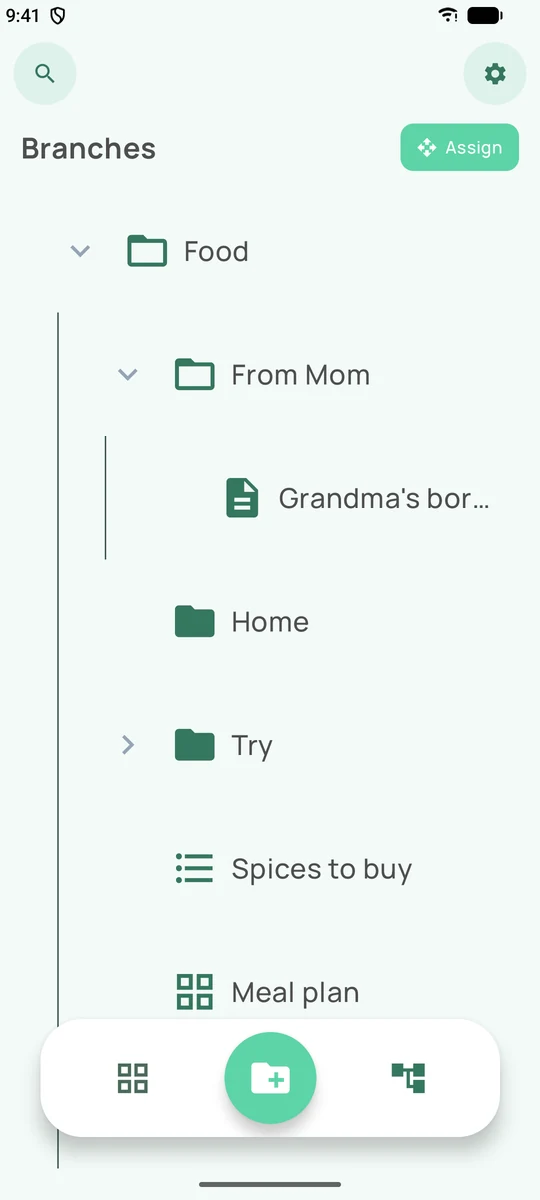
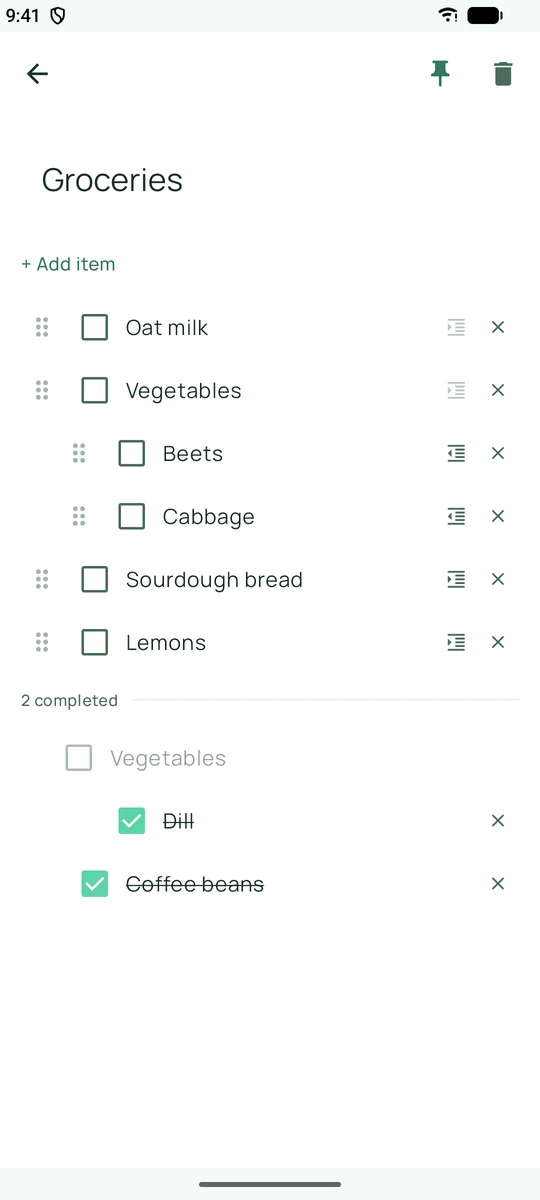
Screenshots from the BaraniukConnection repository, version B21. These are the author's materials, not our mobile app test.
How the app works
Origami Notes is described as a notepad: the user records thoughts, creates lists, and organizes them. AI chat or AI-generated notes are not listed among the B21 features.
The interface is written in Kotlin with Jetpack Compose. Notes and folders are stored in a local database Room, settings are handled via DataStore. AndroidX Glance is used for widgets. This is evident from the configuration and source code.
A useful detail is the shared registry of note types. It defines what is text, what is a task, and what is a list. The old task format with a time grid is kept for reading previous entries, though it is no longer offered in the creation menu. Such decisions are almost invisible on the surface, but they matter to people who have already saved their data.
The text editor uses an open-source Compose Rich Editor. In the VDS: Typer module, it has been adapted for the app: the NOTICE file describes changes to links, highlighting, and cursor behavior after autocorrect. A custom product can certainly rely on ready-made libraries—the value lies in how they work together to solve the problem.
There is JSON import and export. For a notepad, the ability to take your records with you is a vital part of the product: people accumulate their own information in it, rather than just pressing buttons for demonstration purposes.
How BaraniukConnection develops the app with Claude's help
The author and developer of Origami Notes is BaraniukConnection. According to him, he forms the idea, independently thinks through the design, finds bugs, and builds the development plan. Claude helps him with writing the code.
This way of working allows the developer to implement their own vision: deciding how to organize entries, what the interface will look like, and what needs to be fixed. AI helps with the software implementation of these ideas. The author clarified the process details in a comment to the material.
The changelog shows how he evolves the product. In the B21 update from October 19, 2026 a new list type, pinned note ordering, drag-and-drop refinements, and fixes for saving when exiting the editor are described. Issues with text spacing and new lines after autocorrect are also mentioned.
This is where the story becomes interesting for those creating their own products with AI. Generating a screen is one step. The next questions are more grounded: will a record disappear after exiting, where will a sub-item move, what will happen to old data after an update?
The repository contains list tests: for example, moving a parent item along with its sub-items and reopening a task after unchecking a sub-item. We have read these checks but have not run them, so we do not claim the build has been tested by us.
Where to find it and what to consider
You should start with the Origami Notes page on GitHub. At the time of review, B21 is available as an APK in the releasesfolder; the build settings specify Android 8.0 or newer. This is an early beta, not a finished mass release.
It is better to make the first entries test entries and check the export. If B18 is already installed, the README warns about a change in the signature key: before deleting the old version, you must export your data and ensure the file is saved. B21 cannot be installed over B18.
The scope of this review is simple: we read the open source code and the author's materials, but we did not run the APK or verify the compliance of the finished file with the source code. Drawing, multimedia attachments, and additional cloud integration in the README are part of the plans.
What the user gets in the end — and what this project teaches
The practical benefit of Origami Notes is gathering related notes and tasks in one place. Text, checklists, and tasks receive convenient formats for them, remain in a shared folder, and are available on Android without registration. Whether this method of organization suits you specifically is worth checking with a few test entries, keeping the beta status in mind.
BaraniukConnection turned his own idea into an Android app using Claude as a development assistant. This is the practical sense of Vibe Coding: a person can create their own product with AI support — conceptualize it, get help with the code, verify the result, and gradually refine it. There is already something to show here: source code, Android build, interface, and update history.
You can take a simple working scheme from this experience: choose one everyday task → describe the desired behavior → create an implementation with AI → test it as a user → fix what is found. Human decisions and attention to detail remain necessary at every step.
If you are planning your own program, try describing one scenario from start to finish. For example: create a list, close the app, open it again, mark items as done, and export. Then ask the AI to help with individual steps and verify each one. To get started, we have our first AI project planner, and for difficulties — a guide to finding errors in AI-generated code.
The BaraniukConnection project can already be examined, studied, and discussed in detail. Also in our selection — the musical LRC Open Player by Myron 2402. Different tasks, different solutions — this is exactly what the community of people making their own things is made of.
Sources and authorship
The author and developer of Origami Notes is BaraniukConnection. Claude helped him with the code. The material was prepared by the Vibe Coding editorial team. Reviewed version of the code: 61496fc8 as of 10.19.2026. Subsequent versions may differ.
- Developer's comment to the first publication, received on 10.20.2026: personal work on the idea, design, plan, and bug hunting, and Claude's help with the code.
- README: features, APK, beta status, and plans.
- B21 update history.
- Version, Android API, and technologies; note types; local database.
- Origin of the editor and VDS refinements: Typer; list tests.
- AndroidManifest; backup rules; rules for older Android versions.
- Import and export; author's screenshots.
Your idea can also become the next story
Show your app to the community: what problem it solves, what can already be tried, and where a fresh perspective is needed. To have an interesting story, you don't necessarily have to build something huge.
Show your project to the community →Another project from our community: Solviq — the Ukrainian version of "What? Where? When?" by Maks Traffic PRO.
Discussion
Share your opinion or ask about the material. Your nickname and comment text will be visible to everyone.
Log in via email
Get a one-time code. No password required.
The code is valid for 10 minutes. Logging in does not subscribe you to the newsletter. Data usage.
Or log in via ChatGPT ↗Loading comments...